Stage 6: Hidden Hazard Field + dropper upgrade
Finish Stage 5. Your coin machine has a working Dropper -> Conveyor -> Collector -> Coins pipeline.
a hidden hazard field, the Stage 7 checkpoint, and a coin-machine pad that upgrades the Dropper's coin value
how to spend coins on a coin-machine upgrade, track a per-player upgrade level, and use that level when creating DroppedCoin parts
a tycoon where the machine earns better coins after the player invests in the Dropper
60-second demo:
- Play Stage 6. Watch the collector pay
+2per dropped coin. - Press the green
DropperUpgradepad after earning enough coins. The counter drops by 40. - Watch the next dropped coin reach the collector. It now pays
+4. - Explain: "This is the tycoon loop: earn coins, spend coins, improve the machine, earn faster."
The big idea
Tycoons are not just about earning coins. They are about reinvesting coins into the machine so the machine earns better.
Today you remove the idea of a player power-up and keep the upgrade tied directly to the coin system. The player buys a Dropper Upgrade. That purchase does not change WalkSpeed, health, or the obby. It changes the value stamped onto each new DroppedCoin.
- upgrade level
- a number that tracks how strong an upgrade is for a player or machine
- reinvest
- spending earned coins to make the coin machine produce better income later
- coin value
- the amount stored on each DroppedCoin's CoinValue attribute before the collector pays it
Build it
Step 1 — Build the hidden hazard field
A wide flat field with five faintly transparent hazard tiles scattered across it. Same shape as the base obby's Stage 6.
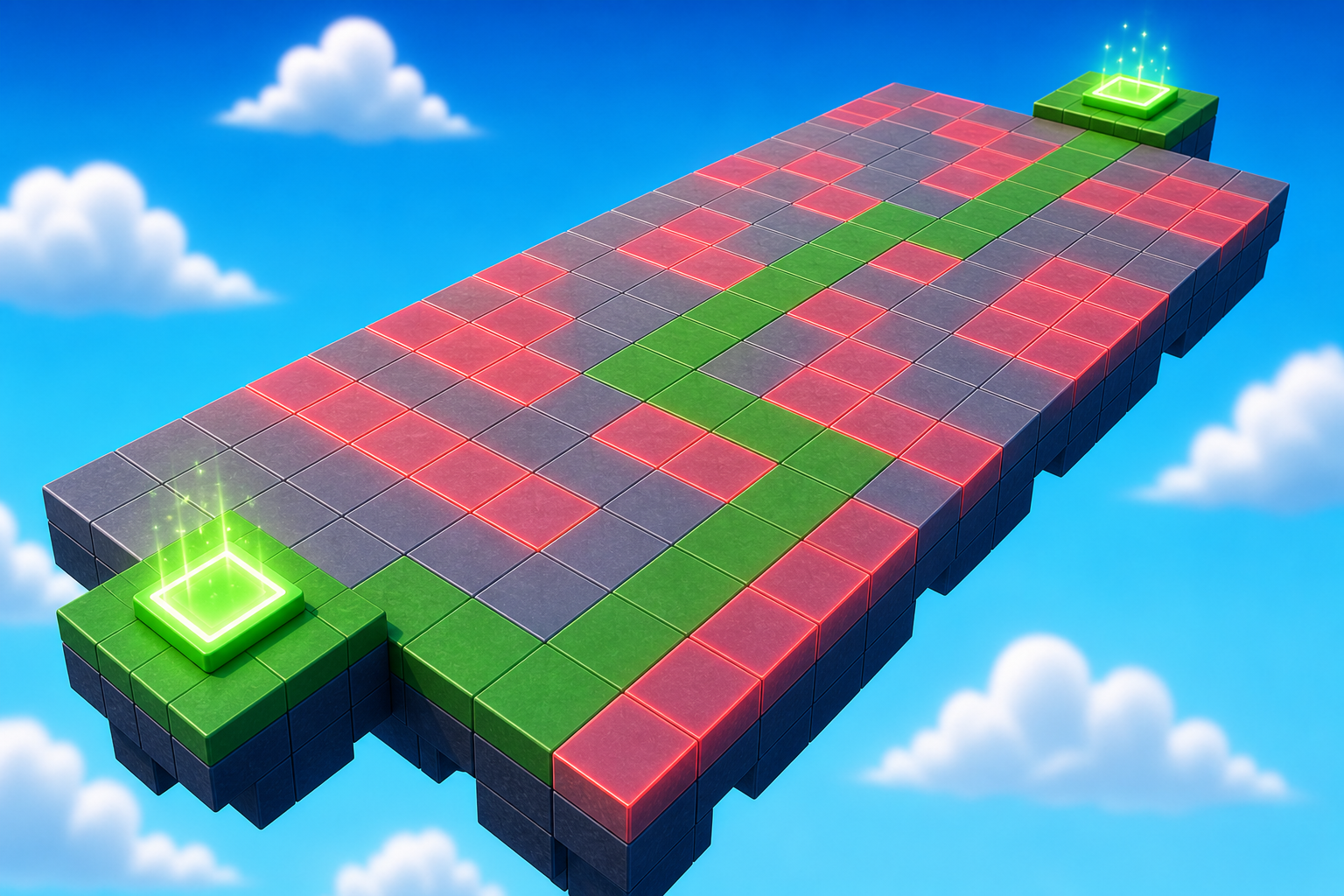
Build this partHazardField
BlockOpen recipe
HazardField
Block- Size
- 20 × 1 × 30
- Color
- Sand stone
- Material
- Sand
- Anchored
- ✓ Yes
- Place
- In front of the Stage 6 cyan pad, stretching forward 30 studs
Build this partHazard_1
BlockOpen recipe
Hazard_1
Block- Size
- 3 × 0.2 × 3
- Color
- Sand stone
- Material
- Sand
- Anchored
- ✓ Yes
- Place
- On HazardField, somewhere in the middle area
Right-click Hazard_1 -> Insert Object -> Script. Open the editor, delete the placeholder line, and type:
local hazard = script.Parent
hazard.Transparency = 0.85

hazard.Touched:Connect(function(otherPart)
  local character = otherPart.Parent
  local humanoid = character:FindFirstChildOfClass("Humanoid")
  if humanoid then humanoid.Health = 0 end
end)
Duplicate Hazard_1 four more times. Drag each copy to a different spot. Leave at least one safe route across.
Step 2 — Wire the Stage 7 checkpoint
Build this partSpawnLocation (Stage 7 — far side of hazard field)
BlockOpen recipe
SpawnLocation (Stage 7 — far side of hazard field)
Block- Size
- 6 × 1 × 6
- Color
- Bright orange
- Material
- Plastic
- Anchored
- ✓ Yes
- Place
- At the far side of HazardField
Also: check AllowTeamChangeOnTouch. Uncheck Neutral. Set TeamColor to Bright orange.
Tag this SpawnLocation with StageNumber = 7.
In Teams, insert a new Team named Stage 7. Set its TeamColor to Bright orange. Uncheck AutoAssignable.
Step 3 — Build the DropperUpgrade pad
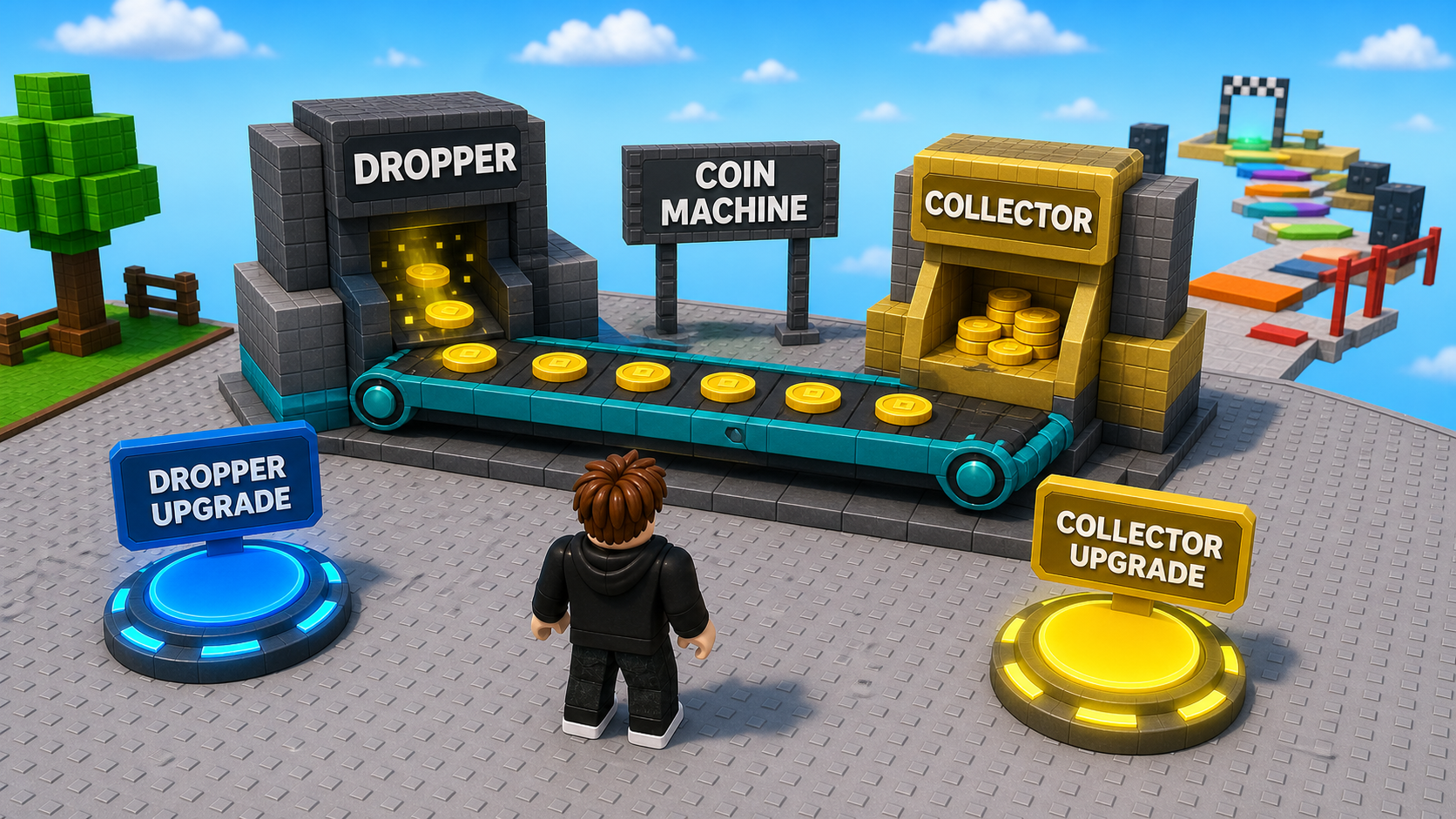
Build this partDropperUpgrade
BlockOpen recipe
DropperUpgrade
Block- Size
- 4 × 0.5 × 4
- Color
- Lime green
- Material
- Neon
- Anchored
- ✓ Yes
- Place
- On the Start Platform (`Lobby` part), near the Dropper so players connect the pad to the machine
This pad upgrades the machine, not the player. Keep it close to the Dropper.
Add a ProximityPrompt to DropperUpgrade:
- ActionText ->
Upgrade Dropper (40 coins) - HoldDuration ->
0.5 - MaxActivationDistance ->
6
Step 4 — Track the player's dropper level
Open TycoonEconomy. Add this near the top of the script, under your service variables:
This is new state for the existing TycoonEconomy script. Put it near the top so later helper functions can read it. You are not replacing the leaderstats code from Stage 1.
local machineUpgrades = {}
local DROPPER_UPGRADE_COST = 40

Players.PlayerAdded:Connect(function(player)
  machineUpgrades[player] = { dropperLevel = 0 }
end)

Players.PlayerRemoving:Connect(function(player)
  machineUpgrades[player] = nil
end)
Press Play. Output should show no errors. Press Stop.
Step 5 — Make the dropper read the upgrade level
Add this helper below the new machineUpgrades section. It does not go inside the dropper loop:
local function getDroppedCoinValue()
  local bestLevel = 0
  for _, data in pairs(machineUpgrades) do
    bestLevel = math.max(bestLevel, data.dropperLevel)
  end
  return 2 + (bestLevel * 2)
end
Then find the Stage 4 dropper loop. Inside that loop, replace this one fixed-value line:
coin:SetAttribute("CoinValue", 2)
with:
coin:SetAttribute("CoinValue", getDroppedCoinValue())
Do not keep both SetAttribute lines. A dropped coin should get its value from getDroppedCoinValue() exactly once.
Press Play. Coins still drop, ride the conveyor, and pay +2. Nothing has been bought yet, so level 0 still pays the base value.
Step 6 — Wire the upgrade purchase
Add this below the dropper helper. This is a new purchase handler, so it stays in addition to the dropper loop:
local dropperUpgradePad = workspace:WaitForChild("DropperUpgrade")
local dropperUpgradePrompt = dropperUpgradePad:FindFirstChildWhichIsA("ProximityPrompt")

dropperUpgradePrompt.Triggered:Connect(function(player)
  if not player or not player:FindFirstChild("leaderstats") then return end
  local data = machineUpgrades[player]
  if not data then return end
  if data.dropperLevel >= 1 then return end
  if player.leaderstats.Coins.Value < DROPPER_UPGRADE_COST then return end

  player.leaderstats.Coins.Value = player.leaderstats.Coins.Value - DROPPER_UPGRADE_COST
  data.dropperLevel = 1
  dropperUpgradePrompt.ActionText = "Dropper Lv 2"
end)
Press Play. Earn 40+ coins, press E on DropperUpgrade, then watch the next coins reach the collector. They now pay +4.
Understand it
The upgrade changes the machine's output, not the player's body. That keeps this course focused: every new system should answer one question, "How does this affect coins?"
The machineUpgrades[player] table stores a number instead of a true/false flag. That matters because coin machines usually grow by levels: level 0, level 1, level 2, and so on. Today you only build one level, but the shape is ready for more.
How the dropper upgrade changes future coins
The pad deducts coins and raises dropperLevel. The dropper reads that level when it creates each new DroppedCoin.
local machineUpgrades = {}
local DROPPER_UPGRADE_COST = 40

local function getDroppedCoinValue()
  local bestLevel = 0
  for _, data in pairs(machineUpgrades) do
    bestLevel = math.max(bestLevel, data.dropperLevel)
  end
  return 2 + (bestLevel * 2)
end

dropperUpgradePrompt.Triggered:Connect(function(player)
  if player.leaderstats.Coins.Value < DROPPER_UPGRADE_COST then return end
  player.leaderstats.Coins.Value -= DROPPER_UPGRADE_COST
  machineUpgrades[player].dropperLevel = 1
end)

coin:SetAttribute("CoinValue", getDroppedCoinValue())
Lines 1–2Track the machine state.
Each player gets a dropperLevel record. In this single-plot camp project, the dropper uses the highest level currently owned by a player in the session.
Lines 4–10Compute the new coin value.
Level 0 pays 2. Level 1 pays 4. The formula is simple enough for students to tune.
Lines 12–16Purchase means reinvest.
The player gives up coins now so future dropped coins are worth more.
Try this
Try this
Three short experiments. Predict before you run, then test your guess.
Change the formula to return 2 + (bestLevel * 5). Predict how quickly the player earns back the 40-coin cost. Does the upgrade feel too strong?
Set DROPPER_UPGRADE_COST to 10, then to 100. Which price makes the purchase feel earned without making the player wait too long?
Stage 7 adds a collector upgrade. Should it increase payout, collect faster, or give feedback? Which option still keeps the course focused on coins?
Test your stage
- Press Play. Coins still drop, move, collect, and pay
+2before the upgrade. - Earn 40+ coins.
- Press E on
DropperUpgrade. Coins drop by 40. - New dropped coins pay
+4when they reach the collector. - Walk the hidden hazard field. Reach the orange Stage 7 pad. Counter increases by 7.
- Design check. The upgrade pad sits close enough to the Dropper that players understand what changed.
If it breaks
- Upgrade pad does nothing. Check the part is named exactly
DropperUpgradeand has a ProximityPrompt. - Coins still pay +2 after buying. Check the dropper uses
getDroppedCoinValue()when settingCoinValue. - Output says
machineUpgradesis nil. Move themachineUpgrades = {}line above any function that reads it. - Coins pay +4 immediately before buying. The default
dropperLevelshould be0, not1.
This is the first spending stage, but keep the conversation tied to the machine. Do not introduce player upgrades here. The learning target is reinvestment: better coin machine, better coin income.
- 45 minutes. Hazard field 15. Stage 7 checkpoint 5. DropperUpgrade build + script 20. Tuning/playtest 5.
- If campers fall behind, keep one upgrade level only. Multi-level upgrades belong in the stretch.