Stage 1: Ascending Walls + first coin
Finish the Setup page. Your file should have a Start Platform, a SpawnLocation centered on it, and ServerScriptService open in Explorer.
a three-block climbing wall, the Stage 2 checkpoint, and the first leaderstats script
how Roblox's leaderstats system shows a number above every player's name, and how a server script finds a part by its StageNumber attribute
a playable obstacle where reaching the second checkpoint pays the player 1 coin — visible in the top-right Roblox UI
Before campers start, run this demo (90 seconds):
- Open a finished Stage 1 file in Studio. Press Play.
- Climb the wall slowly. Watch the top-right of the Roblox UI — it shows
Coins 0. - Touch the second pad. The number flips to
Coins 1. - Reset character. The pad's now done — coins stay at 1.
- Explain: "Every tycoon game has that little number in the corner. By the end of Stage 1 you'll have your own."
The big idea
Every obby in this course is the same shape you've seen before — a climbing wall, a checkpoint, a chain of obstacles. What's new is what happens when the player reaches a checkpoint.
In a regular obby, touching a checkpoint just changes where you respawn. In a tycoon, touching a checkpoint also pays you. That payout is what turns "I finished an obstacle" into "I earned something I can spend." Stage 1's job is to wire that first payout.
The Roblox feature that handles this is leaderstats — a folder you build per player, with a value inside (like Coins). Roblox automatically shows whatever is inside leaderstats in the top-right of the screen. You don't have to build a UI; you just have to fill the folder.
Today you build the climbing wall (familiar), the Stage 2 checkpoint (familiar), and one server script that does two things: gives every joining player a leaderstats.Coins value, and adds 1 to it the first time they reach the Stage 2 pad.
- leaderstats
- a magic Folder name Roblox watches — anything you put inside it appears in the top-right player list
- IntValue
- a Roblox object that holds one whole number, like 0 or 7 or 1000
- PlayerAdded event
- fires once for every player who joins the game; perfect for setting up their leaderstats
- GetAttribute
- reads the value of an attribute you added in Properties (like StageNumber)
- GetPlayerFromCharacter
- looks up which player owns the character that touched something — needed because Touched gives you a body part, not a player
- debounce
- a flag that prevents the same event from firing too many times in a row (here: we only want to award the coin once)
Build it
Step 1 — Build the climbing wall
Same three-block staircase as the base obby. You've built this shape before; the recipes go fast.
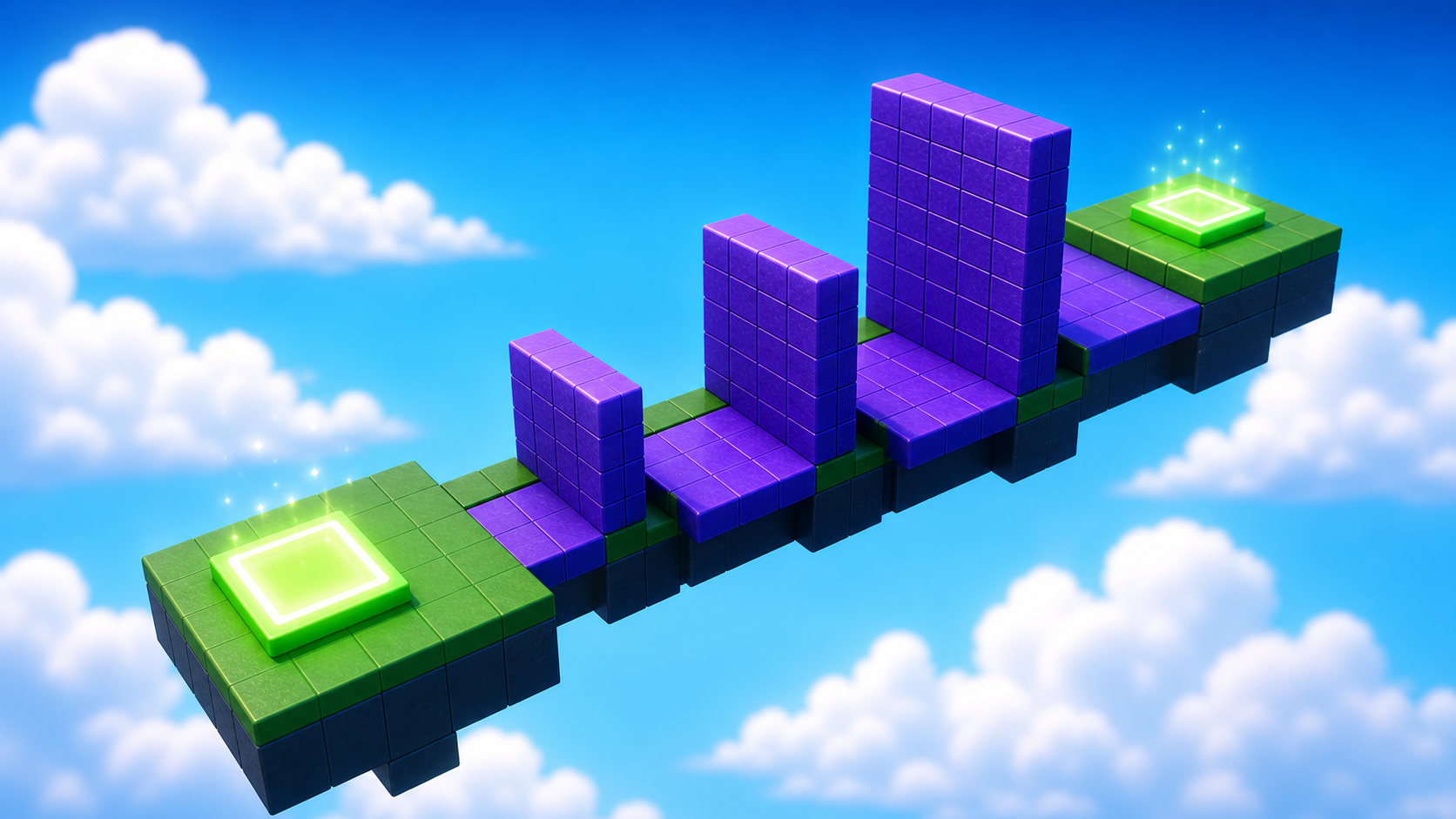
In Workspace, insert three Parts. Tune each one.
Build this partClimbBlock_Short
BlockOpen recipe
ClimbBlock_Short
Block- Size
- 4 × 5 × 2
- Color
- Medium stone grey
- Material
- Slate
- Anchored
- ✓ Yes
- Place
- In front of the Start Platform, sitting on the ground
Build this partClimbBlock_Mid
BlockOpen recipe
ClimbBlock_Mid
Block- Size
- 4 × 7 × 2
- Color
- Medium stone grey
- Material
- Slate
- Anchored
- ✓ Yes
- Place
- Right next to ClimbBlock_Short, taller
Build this partClimbBlock_Tall
BlockOpen recipe
ClimbBlock_Tall
Block- Size
- 4 × 10 × 2
- Color
- Medium stone grey
- Material
- Slate
- Anchored
- ✓ Yes
- Place
- Right next to ClimbBlock_Mid, tallest
Press ▶ Play and confirm you can climb all three. If not, move the blocks closer together.
Step 2 — Wire the Stage 2 checkpoint
The Stage 2 SpawnLocation goes on top of the tallest block. Same pattern as the base obby — but the StageNumber attribute is what the tycoon script will look for, so don't skip it.
Build this partSpawnLocation (Stage 2 — top of the climb)
BlockOpen recipe
SpawnLocation (Stage 2 — top of the climb)
Block- Size
- 6 × 1 × 6
- Color
- Bright red
- Material
- Plastic
- Anchored
- ✓ Yes
- Place
- On top of ClimbBlock_Tall
Also: check AllowTeamChangeOnTouch. Uncheck Neutral. Set TeamColor to Bright red.
2.1 Tag it with its stage number
In the Attributes section of Properties, add a StageNumber attribute (number type) with value 2. This is what the tycoon script will use to find this exact pad — not its name, not its color. Attributes are the contract.
If you forgot how to add an attribute: Properties → scroll to Attributes → click + → name StageNumber, type number, value 2.
2.2 Create the matching Team
- In Explorer, find the Teams folder. If it doesn't exist, right-click Explorer → Insert Service → Teams.
- Right-click Teams → Insert Object → Team.
- Rename it Stage 2.
- Set TeamColor to Bright red.
- Uncheck AutoAssignable.
(Don't forget to also tag the original Stage 1 SpawnLocation — the one on the Start Platform — with StageNumber = 1. The tycoon script doesn't care about Stage 1 today, but Stage 2 of the course will, and Stage 5 of the course will iterate over all of them.)
Press Play. Climb the wall, touch the red pad, reset your character. You should respawn on red. No coins yet — that's what Step 3 adds.
Step 3 — Wire the first leaderstats script
In Explorer, right-click ServerScriptService → Insert Object → Script. Rename the new Script to TycoonEconomy. Double-click to open it. Delete the placeholder line.
You'll build this script in three passes. After each pass, press Play and confirm Output matches before moving on.
Pass 1 — Give every joining player a leaderstats folder
local Players = game:GetService("Players")

Players.PlayerAdded:Connect(function(player)
  local stats = Instance.new("Folder")
  stats.Name = "leaderstats"
  stats.Parent = player

  local coins = Instance.new("IntValue")
  coins.Name = "Coins"
  coins.Value = 0
  coins.Parent = stats

  print(player.Name, "joined with", coins.Value, "coins")
end)
Press Play. Look at the top-right of the Roblox UI — you should see Coins 0 next to your player name. Output should print "Player1 joined with 0 coins" (or similar).
If you don't see Coins in the top-right, the folder name is wrong — it must be exactly leaderstats (lowercase L, no space). Roblox watches for that exact spelling.
Stop.
Pass 2 — Find the Stage 2 SpawnLocation by attribute
Type this above the Players.PlayerAdded line:
local Players = game:GetService("Players")

-- Find the Stage 2 SpawnLocation by checking StageNumber attribute.
local stage2Pad = nil
for _, part in ipairs(workspace:GetChildren()) do
  if part:IsA("SpawnLocation") and part:GetAttribute("StageNumber") == 2 then
    stage2Pad = part
    break
  end
end

print("Found Stage 2 pad:", stage2Pad and stage2Pad.Name or "NOT FOUND")

Players.PlayerAdded:Connect(function(player)
  -- (Pass 1 code stays the same)
end)
Press Play. Output should print "Found Stage 2 pad: SpawnLocation" (the default name; your pad might be named differently if you renamed it).
If Output prints "NOT FOUND", the StageNumber attribute on your Stage 2 SpawnLocation is missing or has the wrong value. Go back to Step 2.1 and confirm.
Stop.
Pass 3 — Pay 1 coin the first time the player touches Stage 2's pad
Below the Players.PlayerAdded block, add:
local hasReachedStage2 = {}

stage2Pad.Touched:Connect(function(otherPart)
  local character = otherPart.Parent
  local player = Players:GetPlayerFromCharacter(character)
  if player and not hasReachedStage2[player] then
    hasReachedStage2[player] = true
    player.leaderstats.Coins.Value = player.leaderstats.Coins.Value + 1
    print(player.Name, "earned a coin. Total:", player.leaderstats.Coins.Value)
  end
end)
Press Play. Climb the wall. Touch the red pad. The top-right should flip from Coins 0 to Coins 1. Reset. Touch the pad again — Coins stays at 1 (the debounce flag did its job).
Walk away from the pad and back onto it. Still 1. The script only pays you the first time per join. That's the design.
Understand it
The leaderstats folder is a Roblox convention, not a feature you import. Roblox watches every Player for a child Folder named exactly leaderstats. If it finds one, it puts whatever values are inside into the top-right player list. Misspell the name (LeaderStats, leaderstat, leader-stats) and nothing appears.
The PlayerAdded event is the only safe place to build per-player state. If you tried to build the folder when the script first runs, you'd build one folder — for nobody. PlayerAdded fires once for every player who joins, so each one gets their own folder.
The attribute lookup is the real tycoon trick. The script doesn't know the SpawnLocation's name (you could rename it). It doesn't know the SpawnLocation's color (you could change it). It only knows that the Stage 2 pad has StageNumber = 2. That's why Setup made you add the attribute — every later tycoon script in this course will find pads the same way.
The hasReachedStage2 table is a debounce. The Touched event fires once per body part per collision — your character has ~12 parts, so without debounce the player would earn 12 coins per touch. The table remembers "has this player already been paid for this pad?" so the answer flips to true the first time and stays true.
How this script pays a coin for reaching the second checkpoint
The script does three jobs: find the right pad once, give every player a coin folder when they join, and pay them the first time they reach the pad.
local Players = game:GetService("Players")

local stage2Pad = nil
for _, part in ipairs(workspace:GetChildren()) do
  if part:IsA("SpawnLocation") and part:GetAttribute("StageNumber") == 2 then
    stage2Pad = part
    break
  end
end

Players.PlayerAdded:Connect(function(player)
  local stats = Instance.new("Folder")
  stats.Name = "leaderstats"
  stats.Parent = player

  local coins = Instance.new("IntValue")
  coins.Name = "Coins"
  coins.Value = 0
  coins.Parent = stats
end)

local hasReachedStage2 = {}

stage2Pad.Touched:Connect(function(otherPart)
  local character = otherPart.Parent
  local player = Players:GetPlayerFromCharacter(character)
  if player and not hasReachedStage2[player] then
    hasReachedStage2[player] = true
    player.leaderstats.Coins.Value = player.leaderstats.Coins.Value + 1
  end
end)
Line 1Grab the Players service.
Players is the Roblox service that tracks who's in the game. Every tycoon script in this course starts with this line because every payout is tied to a specific player.
Lines 3–9Find the Stage 2 pad by its StageNumber attribute.
Loop over every direct child of Workspace. For each one that's a SpawnLocation AND has StageNumber == 2, save a reference. Break out as soon as you find it. This runs ONCE when the script starts, not on every touch.
Lines 11–21Build a leaderstats folder for every joining player.
PlayerAdded fires when someone joins. The function creates a Folder named exactly leaderstats (Roblox watches for that spelling), then puts an IntValue named Coins inside. Roblox sees both and shows 'Coins: 0' in the top-right.
Line 23The debounce table.
Keys are Player objects, values are true/false. hasReachedStage2[player] starts as nil (falsy). After the first payout it becomes true. The if check below stops repeat payouts.
Lines 25–32Pay 1 coin the first time the player touches Stage 2's pad.
Touched gives us otherPart — a body part. Walk up: otherPart.Parent is the character, GetPlayerFromCharacter turns it into a Player. If that player exists AND hasn't been paid yet, flip the flag and bump their Coins value by 1.
Try this
Try this
Three short experiments. Predict before you run, then test your guess.
Comment out the hasReachedStage2 debounce — remove the if not hasReachedStage2[player] then check and just bump the coins unconditionally. Predict what happens when you touch the pad once. Then run it. How high does the counter go from a single touch?
Open the Stage 2 SpawnLocation. Change its StageNumber attribute from 2 to 99. Press Play, climb, touch the pad. What happens? Open Output — what does the Pass 2 print say? Why does the lookup matter more than the pad's name or color?
Right now the script only knows about Stage 2's pad. In Stage 2 of this course you'll wire ALL of the SpawnLocations (Stage 3, Stage 4, ...) to pay coins too. What single change would you make to the script's lookup loop so it grabs every SpawnLocation at once instead of just the one with StageNumber == 2?
Test your stage
- Press ▶ Play. The top-right shows
Coins 0next to your player name. - Climb the wall to the red pad. The counter flips to
Coins 1. - Walk away and back onto the pad. Counter stays at 1 — the debounce works.
- Reset your character (Esc → Reset Character). Counter still at 1; you respawn on red.
- Open the Output window. You see "PlayerN joined with 0 coins" and "PlayerN earned a coin. Total: 1".
- Design check. Does reaching the pad feel like a payout? If the coin appearing is too subtle, the next stages won't carry weight. (Stage 4 fixes this with a coin pickup sound — for now, just notice if the moment lands.)
If it breaks
- The top-right doesn't show Coins at all. The folder name is wrong. It must be exactly
leaderstats— lowercase L, no underscore, no space. Roblox watches for that exact string. - Output says "Found Stage 2 pad: NOT FOUND". Your Stage 2 SpawnLocation either doesn't have a StageNumber attribute, or its value isn't
2. Go to Step 2.1. - The pad pays me 12 coins, not 1. You skipped or broke the debounce. Re-check the
if player and not hasReachedStage2[player] thenline — both conditions matter. - Output says
attempt to index nil with 'Touched'. The Pass 2 lookup didn't find the pad, sostage2Padis nil when Pass 3 tries to wire its Touched event. Run Pass 2 alone first and confirm Output prints the pad's name. - The coin only pays out the first time I play. After a restart it doesn't. That's correct — the debounce table is per-server-run, not per-player-forever. In a real game you'd persist this with DataStoreService; we'll do that in Stage 4 of this course. For now, the debounce is intentional.
- Studio crashes when I press Play. Open Output (View → Output) and read the red error message. The most common Stage 1 crash is a typo in
leaderstats(capital L) — Roblox doesn't crash, but the folder fails silently. The actual crash is usually a missingendon thePlayerAddedfunction.
The biggest pedagogical risk in Stage 1 is campers entering the whole 3-pass script in one shot and never running the in-between checks. Don't let them — the three passes exist because each one teaches a separate thing (PlayerAdded / attribute lookup / Touched debounce). If they skip straight to the final version and it works, they learned one thing instead of three.
- The debounce table (
hasReachedStage2 = {}) is the most subtle line in the script. Walk every camper through why — count the body parts on a Roblox character with them (~12), then count what the coin value would be without debounce. - Common typo:
Player.leaderstatsinstead ofplayer.leaderstats. Lua is case-sensitive. The error in Output will sayattempt to index nil with 'leaderstats'— that's the clue. - Some campers will try to put the Script in Workspace (habit from Part 1 / Makers). It will work, but tell them: starting Stage 4, coin and machine logic should live in ServerScriptService because the server should own rewards and payouts.
- Total time: 50 minutes. The obby climb takes 15, the SpawnLocation + attribute takes 10, and the 3-pass script takes 25 (with reading Output between each pass). Don't rush the Output checks.