Stage 9: Sumo Showdown
We code the mBot in mBlock 5. Keep this tab open all week. Open in a new tab — don’t use the buttons in this page to leave the course.
a robot that finds an opponent, pushes it out of the ring, and never leaves the ring itself
how to combine two sensors and pick which rule wins when both speak up
a sumo mBot ready for a friendly match
Before campers code, show the room:
- Show the two jobs: the ultrasonic sensor finds the other robot; the line sensor guards the edge so the robot doesn't push itself out.
- Run a bot in an empty ring — it spins, searching. Roll a box in front and it charges. Push it toward the black edge and watch it retreat. Three behaviors, one robot.
- Set the rule order: "Staying in the ring comes first. A robot that pushes the other out but falls out itself still loses."
The big idea
This is a contest, and a friendly one: two robots in a ring, each trying to gently push the other outside the black edge line. It pulls together everything you have built — driving, the ultrasonic sensor, the line sensor, and decisions.
Your robot needs two senses doing two jobs at once:
- The line sensor watches the floor. The ring is white inside with a black edge band. If it sees black, the robot is at the edge — it must retreat or it pushes itself out.
- The ultrasonic sensor looks ahead for the opponent. If something is close in front, charge and push. If not, spin to search.
The new skill is deciding which rule wins. When both senses speak at once, you choose an order. Staying in the ring beats everything, so the edge rule goes first.
   forever:
     at the black edge?     →  back up and turn   (safety first)
     opponent close ahead?  →  charge forward
     nothing?               →  spin and search
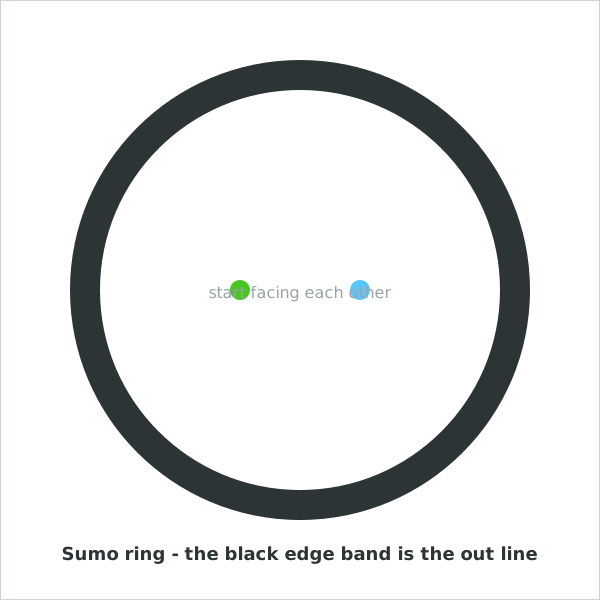
Print or tape a big white circle with a thick black edge band. Robots start back-to-back or facing off on the two start dots. The black band is the 'out' line.
- opponent
- the other robot in the ring
- edge
- the black band that marks the outside of the ring
- priority
- which rule wins when more than one applies
- search
- spinning to look for the opponent
Make sure you've finished Stage 6: Follow the Line (line sensor) and Stage 5: Don't Crash (sense-and-decide). This match keeps it friendly: a gentle push out of the ring wins — no ramming, no speed records.
Build it
Step 1 — Guard the edge
The most important rule first: if the line sensor sees the black edge, back away from it.
Stay in the ring
when green flag clicked
forever
if <<left line sensor sees black? :: sensing> or <right line sensor sees black? :: sensing>> then
set led [all v] to color [#ff3030] :: looks
mBot move [backward v] at speed (50) % :: motion
wait (0.4) seconds
mBot turn [right v] at speed (50) % :: motion
wait (0.4) seconds
else
mBot stop moving :: motion
end
end
Set the robot near the black band and nudge it toward the edge. It should back up and turn away. Notice the word or — either eye seeing black is enough to trigger the retreat.
Step 2 — Find and push the opponent
Fill in the else: if the opponent is close ahead, charge; if not, spin to search.
Search and push
when green flag clicked
forever
if <<left line sensor sees black? :: sensing> or <right line sensor sees black? :: sensing>> then
set led [all v] to color [#ff3030] :: looks
mBot move [backward v] at speed (50) % :: motion
wait (0.4) seconds
mBot turn [right v] at speed (50) % :: motion
wait (0.4) seconds
else
if <(ultrasonic distance (cm) :: sensing) < (20)> then
set led [all v] to color [#47c621] :: looks
mBot move [forward v] at speed (80) % :: motion
else
set led [all v] to color [#57fff4] :: looks
mBot turn [right v] at speed (35) % :: motion
end
end
end
Run it in the ring with a box as a stand-in opponent. Red means "at the edge, backing off," green means "pushing," cyan means "searching." Read the colors to understand every choice it makes.
Step 3 — Add a fair start
Both robots should start at the same moment. Add a countdown so nobody jumps early.
Fair start
when green flag clicked
set led [all v] to color [#ffde59] :: looks
wait (3) seconds
set led [all v] to color [#000000] :: looks
Put this countdown at the very top of your program, before the forever loop. Three seconds of yellow, then the match begins.
Pacing Lab
This lab is required before you move on. The goal is a robot you trust in the ring — one that protects its edge and finds its target.
Part A — Solo ring trials (25 minutes)
Test each behavior alone, in this order:
Edge guard: nudge toward the band → does it retreat?   yes / no
Push: place a box ahead → does it charge?              yes / no
Search: empty ring → does it spin to look?             yes / no
Edge beats push: box near the edge → which wins?       edge / push
That last one matters most: when a box sits right at the black band, the robot must still choose edge and not chase itself out. Re-check your rule order if it doesn't.
Part B — Practice match (10 minutes)
Run a slow, friendly match against a partner's robot at low speed. Not to win — to watch. Where did your robot make a bad choice? Change one rule and run again.
Understand it
The headline skill of this stage is priority — deciding which rule wins when several could fire at once. Your robot can be near the edge and facing the opponent in the same instant. By putting the edge check first, in the outer if, you guaranteed that safety always wins. Order in an if/else is not just neatness; it is how you tell a robot what matters most. Real robots, from vacuum cleaners to cars, rank their rules exactly this way: stay safe first, then do the job.
Notice that you wrote almost no new blocks this stage — you mostly arranged skills you already had. That is what advanced programming actually looks like: not endless new commands, but combining a few reliable pieces in the right order. A sumo bot is a line follower's edge sense plus an obstacle avoider's drive plus one good decision about priority.
Try this
Try this
Three short experiments. Predict before you run, then test your guess.
If you put the ultrasonic (push) check first and the edge check second, what goes wrong? Predict the failure before you try it — then try it to be sure.
Run with push speed 80, then 50. Faster pushes harder but overshoots the edge more often. Which speed wins more friendly matches for your ring size?
Your robot finds and pushes a target while staying in bounds. In Stage 10, the target is a ball and the bound is a field. What from this sumo bot carries straight into robot soccer?
Test your stage
- The robot backs away whenever either eye sees the black edge.
- It charges forward when the opponent is close ahead.
- It spins to search when the ring is empty.
- The edge rule wins even when an opponent is right at the edge.
- Design check. Watch the LED colors during a match. Do its choices make sense, or does it ever do the wrong thing at the wrong time?
If it breaks
- It drives itself out of the ring. The edge rule is too slow or comes second. Make sure the edge check is the outer
if, and that the backward-and-turn is long enough to clear the band. - It never charges. The ultrasonic threshold may be too small, or the opponent is shorter than the sensor's view. Raise the threshold a little and test with a tall box.
- It only spins and never settles. It may keep catching the black edge, or the search turn is too fast to ever line up on a target. Slow the search turn down.
- Both robots just push forever. That is a draw — and fine for a friendly match. Lower speeds make pushes gentler and matches clearer.
Keep it friendly and keep the speeds low. "Gentle push out of the ring wins" prevents the stage from turning into a demolition derby — and slow robots are far easier for kids to observe and debug. Frame every match as "watch what your robot decides," not "beat the other kid."
The teachable moment is rule order. Have campers deliberately swap the edge and push checks and watch the robot drive itself out. Seeing priority fail makes priority click better than any explanation.
This stage reuses everything, so it surfaces shaky earlier skills — a kid whose line sensor was never tuned (Stage 6) will struggle here. Be ready to send them back to fix the foundation rather than patching the sumo code.