Stage 5: Don't Crash
We code the mBot in mBlock 5. Keep this tab open all week. Open in a new tab — don’t use the buttons in this page to leave the course.
a robot that drives forward on its own and turns away before it hits anything
how if/else turns one sensor and one motor into a real behavior
an mBot that roams the floor without crashing
Before campers code, show the room:
- Set a robot loose with just a forward block. It crashes into a wall and keeps pushing. Say: "It can drive and it can see — but it isn't using both yet."
- Add the if/else: if close, turn; else, go. Set it loose again and let it wander the room avoiding obstacles.
- Name it: "This is the robot's first real behavior. We didn't tell it where to go — we told it a rule, and it figures out the path."
The big idea
You have the two pieces you need: the robot can drive (Stage 1) and it can sense distance (Stage 4). This stage snaps them together into the robot's first real behavior — something it does on its own, without you steering.
The rule is simple, and you will say it out loud before you build it:
If something is close, turn away. Otherwise, drive forward.
That word otherwise is the new idea. An if/else block does one thing when the answer is yes and a different thing when the answer is no. Inside a forever loop, the robot checks the rule over and over — drive, drive, drive, wall!, turn, drive, drive. You did not plan the path. The rule makes the path.
   forever:
     is something close?
        yes →  turn away
        no  →  drive forward
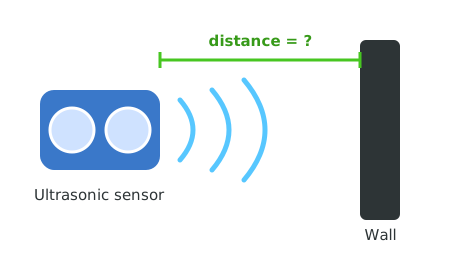
The same sensor from Stage 4 — now its number decides how the wheels move.
- behavior
- something the robot does on its own from a rule
- if/else
- do one thing when the answer is yes, another when it is no
- autonomous
- acting on its own, with no one steering
- react
- to change what you do because of what you sense
Make sure you've finished Stage 4: How Far Is the Wall? — your robot reads distance and reacts. Give it open floor space again, like in Stage 1.
Build it
Step 1 — Drive forward and watch for walls
Start by driving forward and only reacting when something is close. For now, just stop at a wall.
Stop at the wall
when green flag clicked
forever
if <(ultrasonic distance (cm) :: sensing) < (15)> then
mBot stop moving :: motion
else
mBot move [forward v] at speed (40) % :: motion
end
end
Run it and slide a book in front of the robot. It drives forward, then stops when the book is close. Sense plus drive, working together.
Step 2 — Turn away instead of stopping
Stopping is safe, but a roaming robot should get unstuck. When it sees a wall, make it back up a little and turn.
Turn away
when green flag clicked
forever
if <(ultrasonic distance (cm) :: sensing) < (15)> then
set led [all v] to color [#ff3030] :: looks
mBot move [backward v] at speed (40) % :: motion
wait (0.4) seconds
mBot turn [right v] at speed (40) % :: motion
wait (0.5) seconds
else
set led [all v] to color [#47c621] :: looks
mBot move [forward v] at speed (40) % :: motion
end
end
Set it on the floor and let it go. It roams, and every time it nears something it backs up, turns, and carries on. That is autonomous behavior.
Step 3 — Tune it so it stops cleanly
When the program stops, the motors should too. Add a stop at the very end, and make sure your turn is long enough to actually clear the wall.
Watch your robot for a full minute. Does it ever get stuck — turning into the same wall again and again? If so, your turn time is too short. Raise the turn's wait until it reliably points somewhere open.
Pacing Lab
This lab is required before you move on. The goal is a robot that survives on its own, not one that needs rescuing every few seconds.
Part A — One-minute survival test (20 minutes)
Set the robot loose in a bounded area (a taped square, or a ring of books). Time one minute. Each time you have to rescue it from being stuck, make a tally:
Rescues in one minute: |||| ...
What got it stuck: ____________________
The fix I tried: _____________________
New rescue count: ____
Adjust the turn time and threshold until it survives a full minute with zero rescues.
Part B — Predict-the-path partner check (10 minutes)
With a partner, set the robot in front of a corner. Before you run it, both of you guess which way it will escape. Run it and see. Talk about why it chose that path — it comes straight from your rule.
Understand it
The whole behavior lives in one if/else inside a forever loop. That tiny shape — keep checking; if this, do that, otherwise do the other — is the backbone of almost every robot, drone, and self-driving car. You are not writing a path; you are writing a rule, and the rule plus the world produces the path. That is a genuinely different way of thinking, and it is why robots can handle rooms they have never seen.
Notice that the robot is not smart. It cannot see the whole room — only what is straight ahead, right now. So it sometimes makes clumsy choices, like turning into a corner. Good robot behavior is not about cleverness; it is about a rule that recovers well from mistakes. Your tuning in the lab — back up then turn, turn long enough — is exactly that recovery design.
Try this
Try this
Three short experiments. Predict before you run, then test your guess.
If you make the turn time much shorter, what happens when the robot meets a long wall head-on? Picture it before you test.
Try turning right every time, then try turning left every time. In a room with a tricky corner, does one direction get stuck more than the other?
Your robot avoids walls but wanders randomly. In Stage 8, you will use this same sense-and-decide rule to solve a maze on purpose. What would you have to add to turn "don't crash" into "find the exit"?
Test your stage
- The robot drives forward on its own when the path is clear.
- It backs up and turns away before hitting an obstacle.
- The LED shows green while roaming and red while avoiding.
- It survived your one-minute test with no rescues.
- Design check. Watch it for a minute. Does it recover smoothly, or does it look panicked? What one change would make it calmer?
If it breaks
- It crashes anyway. The threshold is too small or the speed is too high — the robot reaches the wall before the turn finishes. Raise the threshold, or lower the speed so it has time to react.
- It spins in place forever. The turn is too long, or it keeps seeing the same near object. Shorten the turn, or back up more before turning.
- It gets stuck in a corner. Corners are hard — the robot can only see straight ahead. Try backing up longer, or alternating turn directions (see the stretch).
- It freezes when the program starts. Make sure the forward block is in the
elsebranch, not left out. If both branches don't drive, the robot just sits there.
This is the payoff stage for the whole first half: drive (1), sense (4), and decide (5) come together. Have campers say the rule out loud — "if close, turn; otherwise, go" — before they touch blocks. The if/else makes sense to almost everyone once they've spoken the rule first.
The most common bug is the forward block landing outside the else, so the robot never drives. The second is too-high speed beating the reaction time. Both show up immediately in the survival test, which is why the lab is timed and counted.
Bounded arenas save your sanity. A taped square or a ring of books keeps twenty roaming robots from scattering across the building and makes the survival test meaningful.